 |
   
|
 | |
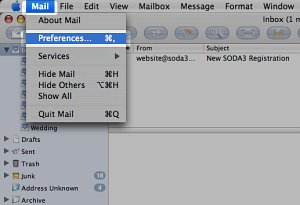
Finding your email settings in Apple MailThis page shows you how to find your email settings from Apple Mail. 1. Click Mail, then Preferences
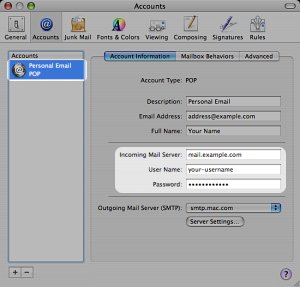
2. Click Accounts in the top bar
3. Click the account in the list that you want SODA3™ to check. The settings needed for SODA3™ will be shown on the right.
Note that the password will be shown as dots; if you don't know your email password, contact your email service provider for help. Tip: If you have webmail access to your email, the password you use for that is probably the same. When you have found your settings, [ click here ] to enter them into SODA3™. |

SODA3™ & © SES IP Holdings Ltd, 13 Freeland Park, BH16 6FH, United Kingdom.
Operated under license by Wizard Island Software LLC, 1750 Delta Waters Rd #102-212, Medford Oregon 97504